
Welcome! You want a headshot that looks amazing. But most importantly, you want it to look unmistakably like you. That’s what ethical photo editing is all about.
Think of professional retouching like tailoring a suit. The aim is to get a perfect fit that highlights your natural shape. It’s not about creating a new look. This is correction.
Transformation is like wearing a costume. It might grab attention, but it hides who you really are.
Your image in professional settings is key to building trust. Authentic retouching enhances your true look, making you seem confident and friendly. But over-editing can raise doubts about your credibility. People might wonder what else is being changed.
We guide you to believe in the highest retouching standards that value authenticity. We aim to make you look your best, not someone else. This approach is shaping the future of photo retouching, where being real is essential.
What’s Appropriate: skin cleanup, flyaways, color balance, lint; what to avoid
Think of ethical retouching as a skilled cleaner for a cherished rug. It removes the distracting stain without damaging the fabric’s unique character. Your headshot is that treasured item. The goal is to present it in its best light, free from temporary distractions.
So, what gets the green light? Appropriate edits are subtle, corrective, and truth-preserving. They handle the small stuff that wouldn’t be there on your best day. Let’s walk through them together.
First, gentle skin cleanup is perfectly fine. We’re talking about that temporary blemish that showed up the morning of the shoot. A minor redness or a sleepy under-eye shadow is okay. The key is to preserve your natural skin texture—the fine lines, pores, and freckles that make your face uniquely yours. We clean the “stain” but keep the “fabric.”
Next, let’s talk hair. Taming stray hairs and flyaways is a standard fix. A few wild strands can pull focus from your eyes and smile. Gently softening these keeps the look polished and professional without altering your hairstyle’s fundamental shape.
Color balance is another essential tweak. Sometimes studio or natural light can cast a slight color tint on your skin. Adjusting this ensures your complexion looks true-to-life, not oddly green or orange. It’s about accuracy, not alteration.
Lastly, removing distracting lint, dust specks, or a loose thread on your clothing is always appropriate. These are environmental artifacts, not part of you, and cleaning them up simply removes a minor visual clutter.
Now, for the friendly but firm “what to avoid” list. These edits cross the line from polishing to reinventing, which erodes trust. Steer clear of:
- Over-smoothing skin: That plastic, poreless look is a dead giveaway. It removes your natural skin texture and makes the photo feel dishonest.
- Altering facial structure: Slimming jaws, enlarging eyes, or changing the shape of your nose doesn’t present *you*. It presents an idealized avatar.
- Changing natural eye color: Your eyes are perfect as they are. Switching them from brown to blue is pure fiction.
- Removing permanent features: Beauty marks, scars, or distinctive moles are part of your story. Erasing them erases a piece of your identity.
The whole process works best as a collaboration. After you receive your proofs and make selects, you provide notes. A clear understanding why timing matters in professional helps set expectations for revisions and turn-times. Your final headshot should feel like you, just on a particular great day—authentic, confident, and ready for the world to see.
Inclusive & Ethical Considerations
When we use digital tools, we must ask: Are we making this person’s image better, or are we hiding part of who they are? This question is at the heart of ethical headshot retouching. It moves us from just technical skills to respecting and valuing human dignity.
We aim for a portrait that truly feels like them, not just a filtered version. This requires a deep commitment to DEI sensitivity. It’s not just a rule; it’s how we see every editing choice.
Let’s look at what this means for the most sensitive parts of a portrait.
Representing Skin Tones Accurately
Skin tone is a key part of a person’s identity. Our editing must show the full range of human color. The rule is clear: we fix lighting, but we never change someone’s natural color.
This means we balance color casts to show the true skin tone. The final image should look like the person on their best day, in perfect light—not like someone else.
Approaching Scars with Sensitivity
Scars, birthmarks, and other permanent features tell a story. Our job is to respect that story, and the only right way to handle it is through collaboration.
We always ask the subject what they want. Some might prefer a scar to be less visible, while others may want it to remain fully visible as part of their personal narrative. When changes are made, we ensure the skin still looks real and lived-in, maintaining authenticity and trust.
Much like a traveling sketchbook library, where artists carry their tools and refine their craft while honoring their creative journey, ethical headshot editing respects the subject’s unique features. Each adjustment is thoughtful and intentional, preserving individuality while presenting a polished, professional image.
Celebrating Cultural Hair Textures & Styles
Hair is deeply cultural. Retouching should celebrate and clean up natural textures and styles, not change them. This is key for DEI sensitivity.
We might remove flyaways or even out lighting on a beautiful braid-out or locs. But we wouldn’t digitally “smooth” coily hair to look straight or thin out styled edges. The edit respects the style, it doesn’t change it.
| Feature | Standard Approach (Risk) | Inclusive & Ethical Approach |
|---|---|---|
| Skin Tone | Lightening or “brightening” to a common benchmark, risking homogenization. | Color correction for accuracy only. Faithfully representing the individual’s unique hue. |
| Scars & Marks | Automatically removing them as “flaws” without consultation. | Collaborating with the subject. Honoring their choice to minimize or display their personal story. |
| Cultural Hair | Smoothing or thinning textures to align with a dominant aesthetic. | Cleaning up the existing style with celebration. Preserving the integrity of textures and cultural significance. |
How do you make this happen? It begins with choosing your retoucher wisely. Look for a professional whose work shows genuine diversity. Have a talk about their views on these topics.
True DEI sensitivity means your retoucher sees diversity as essential. They are a partner in showing the real, powerful you to the world.
Workflow: proofs → selects → notes → revisions; turn-times
Getting from your photo session to your final headshot is a team effort. We’ve made a simple workflow to keep you in the loop at every step. It’s like a map for our partnership!
Our workflow has four stages: proofs, selects, notes, and revisions. Each step builds on the last, making sure your vision is the guide. Here’s what you can expect.
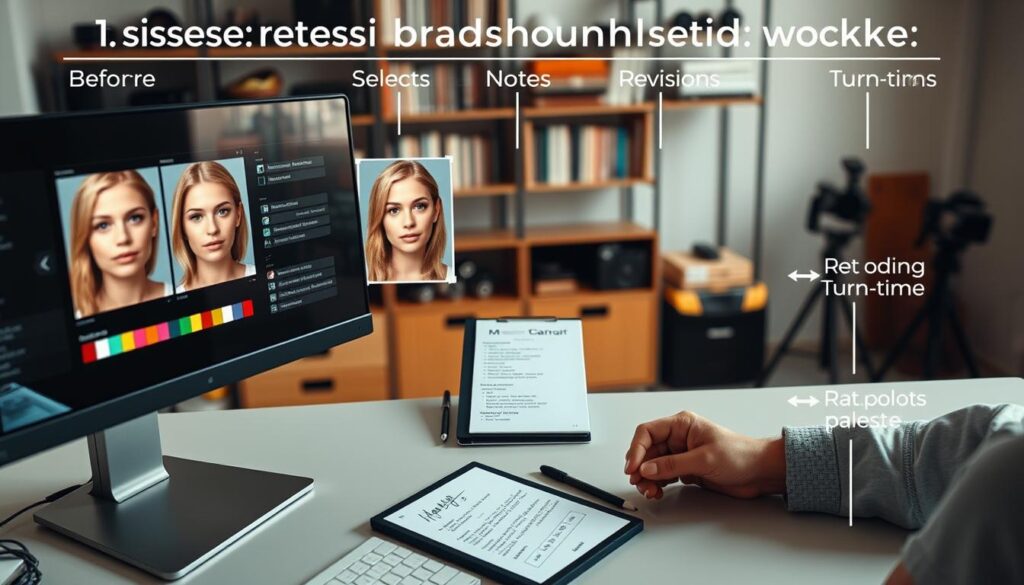
First, you get your proofs. This is a private online gallery with your images after a basic edit. We adjust the color and exposure to give you a clean start. Your job is just to look over them.
Next, you pick your selects. From the gallery, choose the images you love most. These are the ones where you feel like you’re at your best. They’re the starting point for our detailed work.
Then, you give us your notes. This is your chance to be specific. Instead of saying “make it better,” say “soften the shadow under my chin on image #3” or “reduce the shine on my forehead.” The more detail, the better the result.
After that, we deliver your revisions. We use your notes to make the ethical edits we talked about. You’ll get a new version of your selected image for the final okay. We often get it right the first time, but we’re happy to make small changes if needed.
Being detailed in your notes is key! Clear feedback helps us avoid going back and forth. It ensures you get a headshot that truly feels like you. Don’t hold back—we want to hear your thoughts.
Now, let’s talk about turn-times. Quality, ethical retouching takes time. We need a few business days to complete your revisions. Rushing can lead to mistakes. It’s like cooking a meal—it needs the right time to be perfect!
To see the whole process at a glance, here’s a summary of each step, your role, and our typical timeline:
| Workflow Step | Your Action | Our Action | Typical Timeline |
|---|---|---|---|
| Proofs Delivery | Review the lightly edited gallery. | Apply basic color & exposure corrections to all images. | 1-2 business days after shoot. |
| Selects | Choose your favorite image(s) for retouching. | Prepare the selected files for detailed editing. | Within 48 hours of receiving proofs. |
| Notes & Feedback | Provide specific, detailed edit requests. | Analyze notes to plan the retouching approach. | As soon as you’re ready—the sooner, the better! |
| Revisions Delivery | Review the retouched image and approve or request tweaks. | Execute all ethical edits based on your notes. | 3-5 business days after receiving notes. |
| Final File Delivery | Download your perfect headshot! | Export and send final high-resolution files. | Within 24 hours of your approval. |
This structured approach makes professional retouching clear. It ensures you get a headshot you’re proud of, on time. Ready to start the journey?
File Delivery: crops for LinkedIn, ATS, press, speaking events
Let’s talk about the final, important step: delivering your headshot in the right formats. Your beautifully retouched portrait is ready. But, a one-size-fits-all file won’t work in the professional world. Each platform has its own rules for dimensions and composition.
Getting the specific “crops” right makes your headshot look intentional and professional everywhere. Think of it as tailoring a suit. The master file is the fabric, and each crop is a perfectly fitted garment for a specific occasion.
For your LinkedIn profile picture, you need a tight, engaging crop. This image is small and viewed quickly, so it must be compelling. The ideal focus is from the mid-chest up, with your eyes near the top third of the frame. This creates a direct, approachable connection with anyone viewing your profile.
When applying for jobs, many companies use ATS (Applicant Tracking Systems) that parse resumes. These systems often handle square images best. A square crop from your master file ensures your photo displays correctly and doesn’t get distorted or rejected by automated filters. It’s a small detail that keeps your application looking polished.
Press releases and media kits typically require higher-resolution images. A vertical (portrait) orientation is standard, giving more flexibility for layout designers. This crop should have a bit more space around you than the LinkedIn version, providing a clean, formal look suitable for print or online news articles.
Lastly, speaking event organizers often provide specific templates for speaker headshots. These might require exact dimensions or a particular aspect ratio. Having a versatile master file allows your retoucher to quickly adapt your image to fit these unique slots, making you look prepared and professional on the event website or brochure.
To make this process seamless, here’s a simple checklist you can send when requesting your final files:
- LinkedIn Crop: Tight, engaging crop (approx. 400×400 px to 800×800 px).
- ATS/Square Crop: Clean square version for resumes and applications.
- Press Crop: High-resolution vertical image (e.g., 8×10 in. ratio at 300 DPI).
- Speaking Event Crop: Willingness to provide a custom crop based on organizer template specs.
- Master File: High-resolution, uncropped original for future needs.
By requesting these specific crops, you transform a single photo into a versatile professional tool. Your investment now works across your entire career ecosystem, always putting your best face forward.
Before/After with Annotations (Texture Preserved)
A picture is worth a thousand words, showing the “retouched, not reinvented” idea. Let’s examine a real example. We’ll highlight each edit to show what ethical headshot retouching means in action.
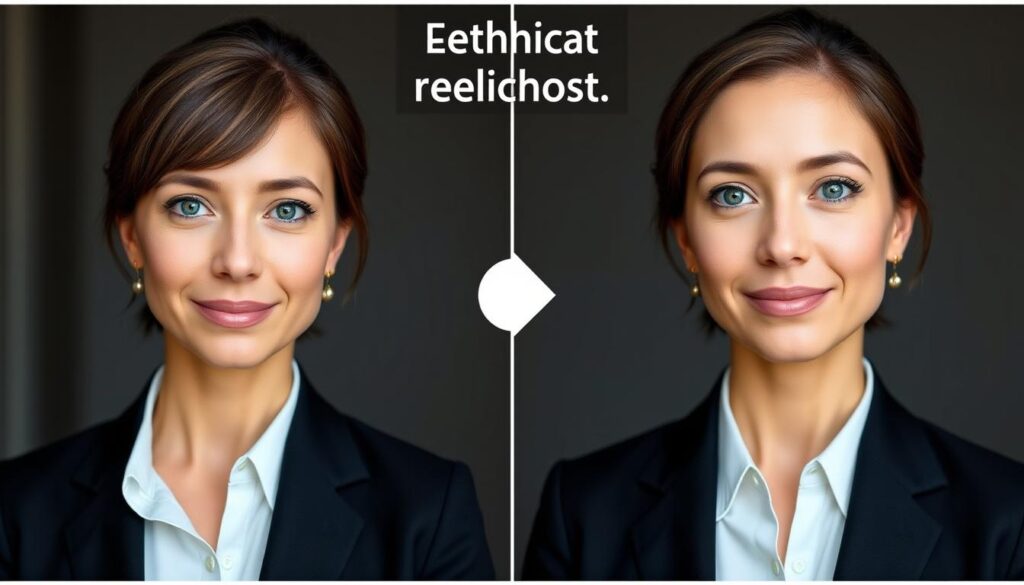
Notice how the subject looks refreshed and professional, yet undeniably themselves. This is the goal. The table below annotates the key changes, showing what was adjusted and—just as importantly—what was left alone.
| Area of Edit | Before (Issue) | After (Solution) | Technique & Rationale |
|---|---|---|---|
| Skin Texture | Visible temporary blemish on cheek. | Blemish removed; natural skin pores and texture fully intact. | Frequency separation was used. This allows us to correct color (the redness) on a separate layer without touching the texture layer, preserving every real skin detail. |
| Under-Eye Shadow | Dark, harsh shadow creating a tired look. | Shadow softened and lightened; no “plastic” or blurred effect. | Careful dodging (lightening) to reduce the shadow’s intensity. The natural contour and slight creasing of the skin were maintained for authenticity. |
| Flyaway Hairs | Distracting stray hairs around the hairline. | Major flyaways cleaned up; hair volume and natural movement kept. | Precise cloning and healing to remove only the most distracting strands. The goal is polish, not a perfectly helmet-like hairline. |
| Color Balance | Slight yellow cast from office lighting. | Neutral, balanced skin tones; warmth retained in a natural way. | Global color correction to neutralize the cast, followed by subtle local adjustments to ensure the skin tone looks accurate and healthy. |
| Clothing | Visible lint and dust particles on jacket. | Jacket appears clean and professional. | Basic cleanup of temporary distractions. The fabric’s weave and texture were not altered or smoothed out. |
See the difference? Each edit solves a specific, temporary problem without rewriting the subject’s authentic appearance. The star of the show here is the preserved texture. You can see the gentle pores in the skin and the individual strands of hair. This is what keeps the portrait trustworthy.
Let’s dive a bit deeper into one of those techniques: frequency separation. Think of it like working on a photograph’s color and its texture on two separate, clear sheets of glass. One layer holds just the colors and tones. The other holds all the fine details like pores and wrinkles.
By separating these “frequencies,” we can fix a red blemish on the color layer without smudging the skin’s real texture on the detail layer underneath. It’s the ultimate tool for precision, ensuring we retouch the problem, not the person.
When you review your own proofs, look for this textural honesty. Your skin should look like your skin, just on a very good day. That’s the heart of “retouched, not reinvented.”
Setting Expectations in Contracts & Style Guides
Your contract is like a written handshake—it’s where trust is solidified. After learning about ethical editing, the next step is to make sure everything is documented clearly. This isn’t about complicated legal terms; it’s about creating a plan that protects your image and peace of mind.
When you hire a photographer or retoucher, always check their retouching standards. These should be in your service agreement or a “Style Guide.” This document shows the professional’s commitment to ethical editing. It turns good intentions into actions you can trust.
So, what should you look for? A good contract will have rules against too much editing. It should say what “basic retouching” means—like fixing skin and balancing colors—and what it doesn’t. This stops mistakes that harm your image before they start.
A great Style Guide goes even further. It shows examples of what’s okay to edit and what’s not. This shared language makes sure you and your photographer are on the same page. It helps manage client expectations from the start.
Let’s compare a vague agreement to one with clear standards. The table below shows how clear language protects your investment and ensures real results.
| Document Element | Vague Agreement | Clear Standards |
|---|---|---|
| Retouching Standards Clause | “Photos will be retouched.” | “Retouching will follow ethical standards, keeping skin and features natural. No extreme slimming, feature changing, or blurring.” |
| Basic Retouching Definition | Not defined, open to interpretation. | Defined as: fixing temporary blemishes, reducing flyaways, color correction, and removing lint. No changing permanent features. |
| Revision Process | “Revisions available.” | “Client can ask for up to two revisions based on notes. All requests must follow agreed retouching standards.” |
| Final Approval | Implied upon delivery. | Requires formal sign-off on final proofs before delivery, ensuring final consent. |
The process for asking for edits should be clear. How many revisions are included? How do you send your notes? A clear workflow makes collaboration smooth and professional. It turns feedback into a helpful conversation, not a mystery.
These documents are a promise of integrity. They make sure everyone is on the same page, respecting your true self. By setting these retouching standards, you’re not just protecting your headshot. You’re investing in a partnership built on trust and respect.
Data Security and Consent
Your headshot is your professional identity. The final step in ethical editing is keeping your image files safe, just like financial data.
Professional retouchers use secure ways like WeTransfer or Dropbox to send you proofs and finals. Your files are stored in encrypted places during the project. This is a must for anyone serious about keeping client data safe.
It’s key to have a clear policy on deleting files after the project is over. A reliable retoucher will remove your raw files and work copies from their main systems once you have your final images. This keeps your digital image safe for a long time.
Consent is also vital. You always get to approve the final edited image before it’s shared publicly. It’s also important that a retoucher can’t use your image in their portfolio or for marketing without your okay. Your image, your rules.
By combining strict data security and clear consent, a technical service becomes a respectful partnership. This ensures your journey from “retouched, not reinvented” ends with full trust in the process and the professional handling it.