

A company is more than just a logo or mission. It’s the people. The mix of personalities and skills is the heartbeat of your entire venture. Capturing this in one photo is not just business photography; it’s preserving culture.
Coordinating a team photo is like trying to herd cats. It’s not just about arranging people and smiles. You’re trying to capture the unique energy of your team’s work together.
This is more than just sending out a meeting invite. It’s a complex task of scheduling and styling. You need to get everyone in the same place, looking like they belong together.
It’s like managing a project and directing the look, all while understanding group dynamics. Are you ready to move from chaos to a well-planned photo session?
Consistency Standards: Maintaining Brand Cohesion Across Individual Team Member Photos
Imagine a band showing up to a concert in different outfits. It’s funny in theory but not in practice. When clients or employees see your “About Us” page, they want to see a team, not a mix of different styles.
Real, authentic professional group portraits tell your story. They show collaboration and trust. But, inconsistency can make your brand seem disorganized. It can undermine the trust you’re trying to build.
To avoid a patchwork look, set a visual framework. This framework turns individual portraits into a cohesive team mosaic.
This framework has three pillars. Think of them as the director’s notes for your company’s visual story. Ignore one, and your story gets fuzzy.
| Pillar of Consistency | What It Means | The Risk of Ignoring It |
|---|---|---|
| Cohesive Editing Style | Locking in color temperature, contrast, skin tone treatment, and background uniformity in post-production. Every photo undergoes the same finish. | Your team appears to exist in different seasons or under different suns. It feels digitally disjointed. |
| Unified Expression & Pose | Deciding as a team: are we projecting confident smiles, thoughtful gazes, or approachable warmth? Shoulders angled the same way? It’s about emotional resonance. | You get a confusing mix of energies. One person looks ready for a boardroom showdown, another for a coffee chat. It screams a lack of directive. |
| Background & Environment Continuity | Using the same backdrop, studio setting, or environmental context. This is the literal common ground your team stands on. | The final grid looks like your team was Photoshopped together from different universes. It kills any sense of a shared space. |
Mastering these pillars is what separates a good professional headshot from a great one that also functions as part of a greater whole. The goal isn’t to erase individuality. It’s to ensure each unique portrait harmonizes with the others.
When viewed individually or as a grid, your team presents a united, professional front. This visual unity is the most direct representation of your company’s integrated culture. It tells a coherent story before a single bio is read.
Ultimately, consistency in your team headshots isn’t about being boring. It’s about being deliberate. It’s the strategic choice to present a synchronized image, proving that the details—right down to the light in everyone’s eyes—matter.
Lighting Challenges: Technical Considerations for Photographing Multiple People
Going from lighting one face to ten is a big leap. It’s like moving from a solo performance to a full play. You have to make sure everyone is well-lit, not hidden in shadows.
In group business photography, the goal is to flatter everyone equally. You want to avoid harsh shadows and ensure everyone looks good. This means finding the right lighting for all skin tones and positions.
Understanding light’s geometry is key. A single flash can be too harsh, creating unflattering shadows. Instead, use a large, soft light source to balance out the lighting.
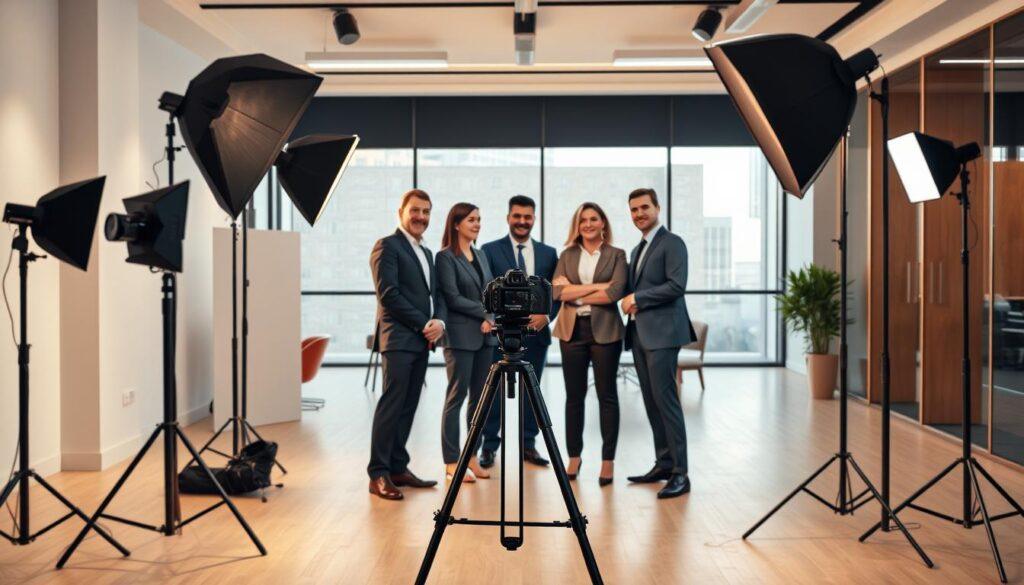
Light modifiers help distribute light evenly. A big softbox or umbrella softens shadows and minimizes harsh lines. Place the light above and at an angle to create a gentle glow.
Dealing with depth in company team photos is another challenge. Use light’s fall-off to your advantage. Keep everyone on the same level and use feathered lighting to light up the back row.
| Modifier Type | Best For Group Size | Key Advantage | Common Pitfall to Avoid |
|---|---|---|---|
| Large Rectangular Softbox | Medium to Large (5-15 people) | Creates even, wraparound light; minimizes individual shadows. | Can produce flat light if placed directly frontal. Angle it for dimension. |
| Shoot-Through Umbrella | Small to Medium (3-8 people) | Soft, forgiving light that’s fast to set up and adjust. | Light spill can affect background; less control than a softbox. |
| Gridded Octabox | Small teams (2-6 people) | Controls spill, directing light precisely onto the group for a cinematic look. | Too narrow a beam for wider groups; can create light fall-off on edges. |
| Natural Window Light + Reflectors | Any size, with space | Most flattering, natural quality; excellent for authentic company team photos. | Highly dependent on time of day and weather; requires reflectors to fill shadows. |
Always consider the environment. A large, north-facing window is ideal for soft, natural light. Use reflectors to bounce light into shadowed areas, ensuring everyone is well-lit.
Successful group business photography is about balance and harmony. It’s about using light to make everyone look great and part of a cohesive team. For more tips on arranging people in your photos, check out this guide on mastering group photos.
Posing Strategies: Group Dynamics and Individual Positioning for Professional Results
The usual ‘everyone line up and grin’ pose is like elevator music. It’s forgettable and lacks character. For business team photography, think like a semiotician. Every pose, glance, and space between team members carries meaning.
What does your formation say? A single-row lineup feels like a police lineup or an awkward family photo. But a staggered, layered formation adds depth and shows strategic thinking. A loose, conversational cluster looks like organic collaboration and creative energy. Your choice is your first, silent brand statement.
Then, there’s the delicate matter of hierarchy. How do you place the CEO or team lead without making it look like a monarchy? The answer is not always “front and center.” Instead, integrate them into the group, maybe slightly forward in a staggered line, or as part of a conversational cluster. Their authority should be felt through their engaged presence, not just their position.
The real challenge is capturing interaction that looks natural. No one wants their professional group portraits to look like a hostage situation with fake smiles. The goal is to guide, not just command.
Instead of “look happy,” aim to create a moment. Try these strategies:
- Direct a conversation: “Jane, tell Mark about the big win last quarter.” This will lead to a real glance and smile.
- Create subtle movement: “Everyone, take a half-step inward.” This breaks stiffness and makes the group look more unified and intentional.
- Use the environment: Lean against a table, gather around a monitor. Props and settings give people something to do, not just be.
Here, the photographer becomes part choreographer, part therapist. A good director observes the team’s natural dynamic and enhances it. Identify the natural collaborators and who defers to whom. Your goal is to capture the team’s authentic rhythm, not to stage a fake harmony.
The result is huge. Authentic business team photography builds trust. It shows clients and recruits what it’s like to work with you. It’s a moment of your team’s true operation, not a corporate show.
So, ditch the lineup. Dive into the semiotics. Your professional group portraits should tell the story of how your team works, not just what they look like. The difference is everything.
Wardrobe Coordination: Color Schemes and Styling That Work for Entire Teams
Team wardrobe coordination is like a diplomatic meeting, not a military operation. It’s not about making everyone wear the same thing. It’s about finding a balance between being unique and looking like a team.
Get it wrong, and your company team photos might look like a bad audition. Get it right, and you show a strong, united brand image.
So, how do you navigate this tricky fashion world? You need a plan, not a strict rule.

Start with color theory, not strict rules. Instead of saying “everyone must wear navy,” suggest a color palette. A good color scheme ties your team headshots together.
Choose two to three main colors that match your brand. Then, let team members pick shades and tones from that palette. This way, the accountant can wear dark gray and the creative director can wear light blue. They’re different, but they match.
Your guide talks about three main styles: Polished and Professional, Casual and Approachable, and Dynamic and Modern. Each style has its own way of dressing. The key is to pick one and guide your team to follow it.
| Style Vibe | Color Scheme Strategy | Attire Guidance |
|---|---|---|
| Polished & Professional | Neutrals (navy, grey, black) with one accent color (e.g., brand blue). | Structured blazers, tailored dresses, button-downs. “Coordinated” means similar formality, not identical items. |
| Casual & Approachable | Earthy tones or soft pastels. Think denim blues, cream, olive. | Smart jeans, crisp knits, clean sneakers or loafers. The coordination is in the relaxed, unified feel. |
| Dynamic & Modern | High-contrast or monochromatic bold colors (all black, black & white). | Contemporary cuts, minimalist patterns, statement pieces that share a modern aesthetic. |
Use a mood board, not a strict guide. Show examples of the style you want. This is more inspiring than a list of rules. Offer a range of options within the color palette.
Communication is key. Frame the guidelines as creative challenges. Say, “We’re aiming for a cohesive, modern look using this color palette. Feel free to express your personal style within it.” This turns a rule into an invitation.
The result? Everyone looks like themselves, but a bit more polished. Your company team photos will show a united yet diverse team. Your team headshots will stand out while fitting your brand’s look. That’s the perfect balance.
Individual vs Group Shots: Maximizing Session Value with Multiple Photo Configurations
Think of your team photography session like a music album. You want the hit singles, the deep cuts, and the grand finale. Why pick just one when you can have it all? A photography shoot is a big investment. The smart move is to get the most out of it.
This isn’t about showing off. It’s about being useful. Your team headshots and professional group portraits are more than just for your website. They’re used in press features, brochures, newsletters, and LinkedIn profiles. A single group shot is like releasing only a B-side.
Let’s plan efficiently. Start with professional solos: clear, individual headshots. These are your LinkedIn profile and press kit must-haves. Then, move to collaboration duets—pairs and trios that show real teamwork. The CEO and CFO, the lead designer and developer.
End with the full ensemble shot. The big reveal.
Each photo setup has its own purpose in your marketing. A press release needs that key trio. A social media reel loves department-specific duos. Your website’s culture page needs the whole team. You’re getting more than a photo. You’re getting an album, a single, and an EP all in one.
The table below shows a smart way to plan your photos. It tells you what to shoot, why, and how to do it efficiently.
| Configuration | Primary Purpose | Best Use Cases | Session Flow Tip |
|---|---|---|---|
| Individual Headshots | Personal branding & professional identity | LinkedIn profiles, email signatures, speaker bios | Shoot first. Gets people comfortable in front of the lens. |
| Duo & Trio Shots | Highlight collaboration & team structure | Press releases, case study features, department highlights | Shoot after solos. Pair people who actually work together. |
| Full Group Portrait | Showcase company culture & entire team | Website “About” page, recruiting materials, annual reports | Shoot last. The energy peaks here—capture it. |
This approach turns a simple photo day into a valuable asset gathering. You move from intimate to epic, building excitement. The individual shots warm up the mood. The small groups share your story. The final group photo is a celebration, not a task.
So, when planning your next session, think about all the possible combinations. Don’t just choose group or individual. Ask how many valuable shots you can get. That’s how you make the most of your professional group portraits investment.
Size Considerations: Photography Strategies for Small Teams vs Large Organizations
When it comes to business team photography, size matters a lot. It’s like using a scalpel to mow a lawn—it just doesn’t work. Moving from a small team to a big department is a big change. It’s not just about adding more people.
For small teams, photography is like a close-up shot. You have time and can get close to the team. The goal is to show their personality and how they work together.
Think of it as telling a story with pictures. Use the team’s environment to show their spirit. A messy whiteboard or a city view can tell a lot about a team.

The photographer needs to be like a director and a psychologist. They capture special moments, like a glance between co-founders. The focus is on being real, not perfect.
But, photographing a big department is a different story. It’s like planning a big event. You need to make sure everything goes smoothly.
With a big team, the structure is key. Where does the leader stand? How do you arrange the team without making it look boring? The message is about being strong and established.
You have to manage the crowd well. Use the space to keep things organized. You’ll need strong lights to cover everyone, not just faces.
Let’s look at the main differences. The table below is a guide for your photography plan.
| Aspect | Small Team (2-10 People) | Large Organization (20+ People) |
|---|---|---|
| Primary Goal | Showcase personality, chemistry, and brand story. | Project unity, structure, and institutional strength. |
| Ideal Location | Authentic work environment or meaningful local backdrop. | Architecturally significant space that implies scale and order. |
| Posing Strategy | Organic, interactive, and relationship-focused. | Hierarchical, geometric, and deliberately composed. |
| Equipment Focus | Prime lenses for detail, portable soft lighting. | Wide lenses for scope, powerful strobes for even coverage. |
| Implied Message | “We are agile, passionate, and hands-on.” | “We are substantial, organized, and here to stay.” |
For small teams, getting everyone to relax is the challenge. For big groups, it’s making sure everyone is seen. One is a delicate dance. The other is a big operation.
Finding the right place changes a lot. A small team might fit in a coffee shop. But a big team needs a big space, like a museum.
The size of the team tells the story. A good group business photography project knows this. It doesn’t try to make a small team look big. And it doesn’t make a small group look too formal.
Know your audience and plan well. The difference between a great photo and a bad one often comes down to understanding the size of the group.
Budget Optimization: Cost-Effective Strategies for Team Photography Projects
Planning for team photos is not just about saving money. It’s about making smart choices with your resources. Every decision, from how long you shoot to where you shoot, affects the final product. Let’s explore how to make the most of your budget.
First, think about how long you want to shoot. A long day might not be the best choice. A focused three-hour session can be more effective. It helps you get the most important company team photos without getting tired.
Choosing a location is also key. Getting permits for many places might seem exciting but can be expensive. Instead, pick one place that can be used in many ways. A good photographer can make any location look great.
Now, let’s talk about hair, makeup, and styling. For important people, you might want to spend more on grooming. But for the rest of the team, a simple guide can help. This way, everyone looks good without spending too much. Your professional group portraits will look cohesive and polished.
The trick is to know when to spend more and when to save. The table below shows where to invest and where to be smart with your budget.
| Investment Area | Premium Play (High-Impact) | Smart Save (Cost-Effective) | Strategic Rationale |
|---|---|---|---|
| Session Duration | Full-Day Capture | Focused 3-Hour Session | Pays for concept execution, not fatigue. Covers all essential company team photos configurations. |
| Location & Permits | Multiple Premium Venues | One Versatile, Permit-Free Site | Eliminates venue fees and transport time. Challenges creativity, often yielding more unique shots. |
| Talent Grooming | On-Site HMU for All | Guide for Team + Pro HMU for Leaders | Ensures key subjects are camera-perfect while empowering the team with clear, actionable style rules. |
| Final Deliverables | Unlimited Retouching & Formats | Curated Selects + Essential Retouching | Focuses post-production budget on the 20% of images used 80% of the time (website, LinkedIn, press). |
Notice a pattern? The premium column isn’t about luxury. It’s about non-negotiable impact. The smart save column isn’t about cheapness. It’s about intelligent resource substitution. Your visual asset budget should feel surgical, not sacrificial.
Seeing this spend as an investment changes everything. A good session gives you assets for years. The cost over time is very small. This is the real ROI: credibility, cohesion, and that special team aura that great professional group portraits capture. So, allocate wisely. Spend where it matters, save where it’s smart, and watch your team’s visual equity grow.
Timeline Management: Efficient Session Flow for Busy Professional Schedules
Your team’s time is precious. A poorly managed photography session can waste it. The goal is to get the shot quickly, without wasting time.
Forget vague plans like “sometime after lunch.” You need a minute-by-minute plan. This plan should be so detailed, even NASA would approve.
First, create a dedicated waiting area. This “green room” keeps everyone focused before the shoot. It prevents the chaos seen in The Office.
Your call sheet is another key tool. Instead of a general email, send specific times to each person. A dedicated assistant helps everyone arrive smoothly, like a Formula 1 pit stop.
Here’s what a good schedule for business team photography looks like:
- Buffer Zones are Non-Negotiable: Add 10-minute buffers every hour. This helps absorb delays without disrupting the rest of the day.
- Batch by Department or Proximity: Start with group shots, then team headshots. This saves travel time and keeps everyone focused.
- The Tech Check First: Spend the first 15 minutes on lighting tests with stand-ins. Never test on your CEO.
- Clear Communication of “On-Deck”: Have the next person ready in the green room. Tell the next one they’re next. This avoids waiting.
Good planning makes your team feel respected. They arrive relaxed, not stressed. They see the operation as smooth, not chaotic.
Efficient planning for team headshots makes a big difference. It shows your company values its image and time. That’s a portrait worth taking.
Update Strategies: Managing Team Photography as Personnel Changes Occur
Think of your team portrait as a living document, not a fossil. A photo from 2019 is outdated, not useful for marketing. Your team grows and changes, so your visual identity must too.
Have a plan for updates. Consider taking new photos every year for key groups. Make sure new hires fit right in during their first shoot. A branding tool backdrop helps a lot here. Take extra photos of the background and note your lighting and colors. This makes it easy to add new company team photos to your collection.
What happens when a key person leaves? Keep the old photos, but update your marketing quickly. You want your group business photography to show growth and stability, not just a moment in time.
At Headshots NYC, we see the best teams have a visual plan. They match wardrobes and backdrops for the future. They know change is the only constant. Is your photography ready for the future?